The AI assistant
The GUI includes an AI assistant that answers questions about the running system, such as “Why did the robot stop?” or “Which agent is the bottleneck?”. It investigates with the GUI’s own views: an overview of the agents, an agent’s beliefs, intentions and messages at any event, searches of the trace, the events around an event, the environment, and the agents’ code. Its answers cite trace events as links: click one, such as #412, to see the system at that point.
The assistant is itself an ASTRA agent (astra.ui.assistant.Debugger, built on the ReAct reasoning agent). It only reads: it cannot change the agents or the environment. It is not part of the system being debugged, so it does not appear among the agents, in the trace or in the profile.
Turning it on
The assistant is off until you turn it on. Open the Assistant panel on the right of the window (⌘⇧A) and click Turn on.
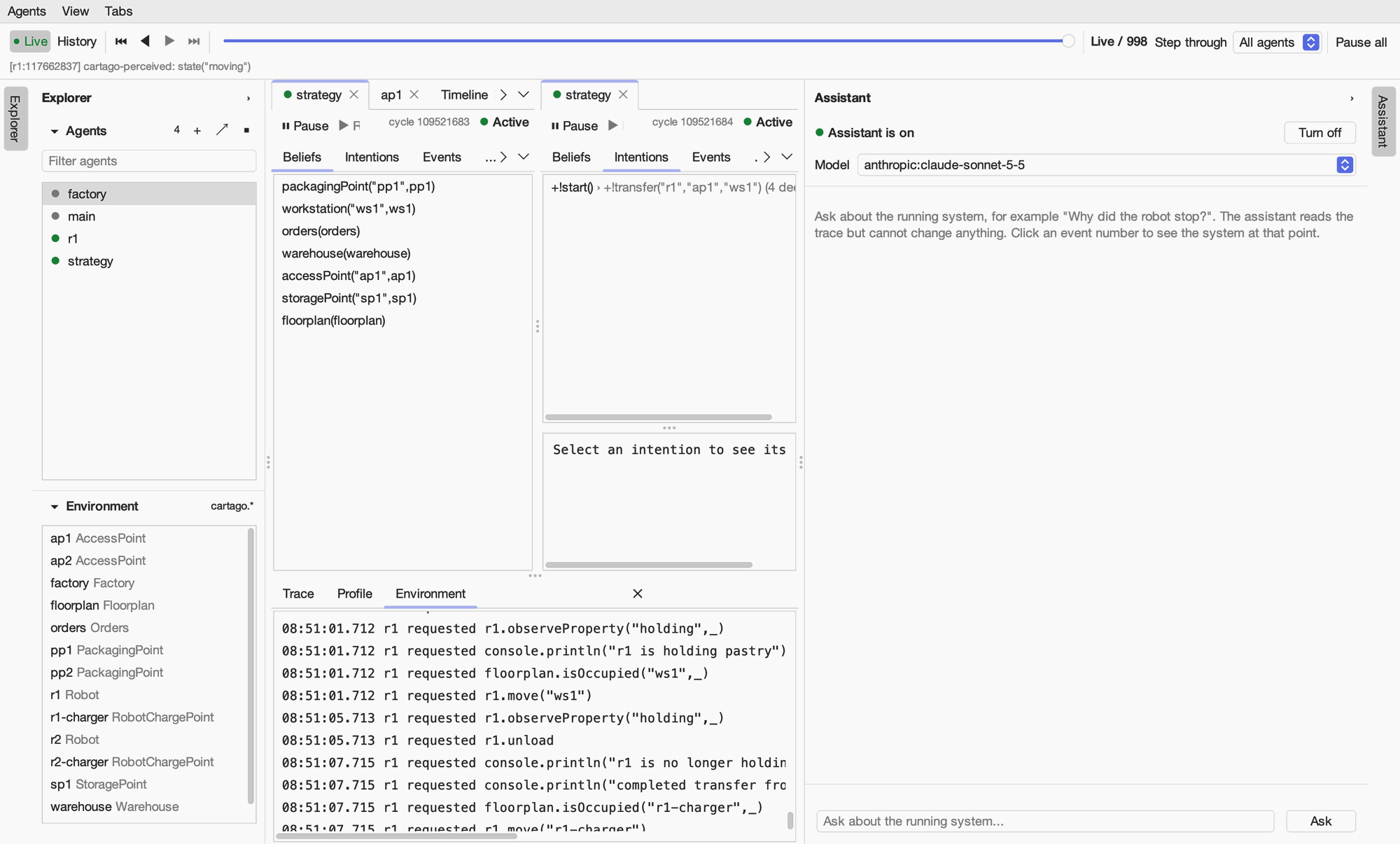
Turning it on records ASTRA_GUI_ASSISTANT=true in the project’s settings file, .env in the project folder (another file can be named with -Dastra.env=<file>). The GUI creates the file if there is none. The same file holds the API keys:
# Whether the assistant is on
ASTRA_GUI_ASSISTANT=true

# The models offered in the assistant's panel, as provider:model; the first is the default
ASTRA_ASSISTANT_MODELS=anthropic:claude-sonnet-5-5,anthropic:claude-opus-5-5,anthropic:claude-haiku-5-5

# API keys, for the providers you use
ANTHROPIC_API_KEY=sk-ant-...
OPENAI_API_KEY=
GEMINI_API_KEY=
Setting |
Meaning |
|---|---|
|
|
|
The models offered, as |
|
The longest reply, in tokens (default 4096). |
|
The providers’ API keys. A key left empty is taken from the environment variable of the same name. |
Keep .env out of git. It holds your API keys. The assistant will not run while git could commit the file: when the file is tracked or not ignored, the panel says so and offers to add it to .gitignore. The astra-gui-assistant module includes .env.example, which can be committed and copied to .env.
When no API key is set, the panel says which one is missing and where to put it; edit .env and click Reload. Turn off records ASTRA_GUI_ASSISTANT=false and stops the assistant agent.
astra:gui adds the assistant to the program’s classpath, unless you run with -Dastra.gui.assistant=false.
Asking questions
Type a question at the bottom of the panel and press Enter. The assistant works through the trace with its tools, which takes a few seconds or more, and then answers. It remembers the conversation, so you can ask follow-up questions, and the model can be changed in the panel at any time.
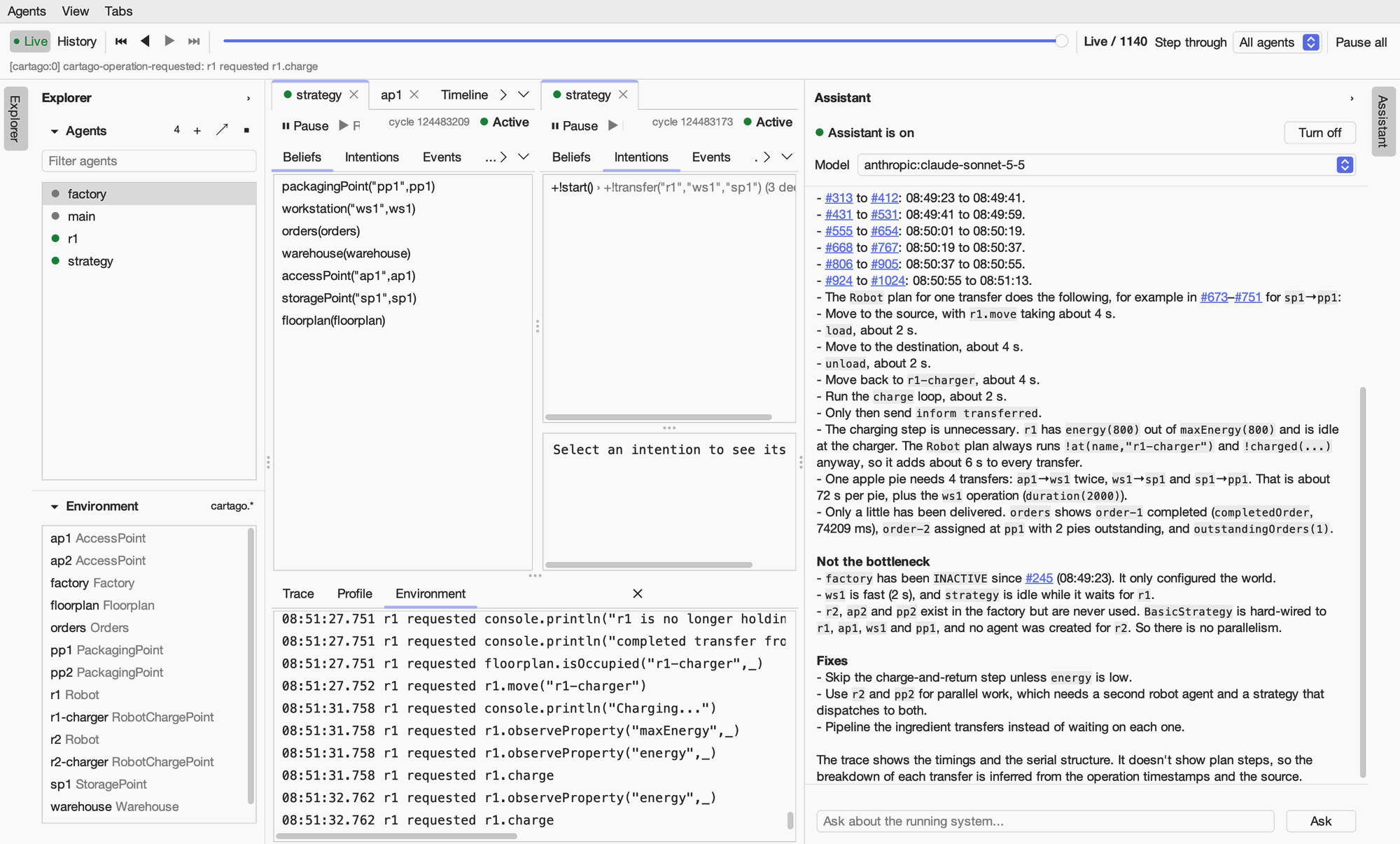
In this example the assistant found, from the trace and the agents’ code, that the factory’s one working robot does every transfer in turn, that it recharges after each transfer even when fully charged, and that the second robot and packaging point are never used. Each claim cites the events it rests on, and it says which conclusions are inferred rather than seen.
Good questions are about behaviour you can observe: why an agent stopped or never started something, why a belief is missing, where a message went, which agent is slow, what an agent was doing at a given time. Plan steps are not traced, so the assistant infers what a plan did from its effects and the agent’s code, and says when the trace does not show something.
What is sent to the model’s provider
To answer, the assistant sends your question and the results of its tools to the model’s provider: agent names and states, beliefs, intentions, messages, trace events, artifact properties and agent code. Do not turn it on for systems whose data must not leave your machine.