Working with MAMS resources
This page builds on Your first MAMS service, using MAMS 2.4.1 and ASTRA 2.6.1. It covers collections, resource state, explicit request decisions and calls to other services.
Items and collections
The Java-Types library distinguishes three resource types:
Resource |
Creation |
Main HTTP operations |
|---|---|---|
Individual item |
Agent calls |
GET reads state; PUT replaces state |
Collection |
Agent calls |
GET reads the collection; POST creates a child |
Collection item |
Created by POST to a collection |
GET reads state; PUT replaces state; DELETE removes the child |
These are the core operations used here. The implementation also provides OPTIONS and, for passive items, PATCH. Supported methods and response bodies depend on the selected resource implementation. Unsupported methods in the current Java-Types artifacts return 405 Method Not Allowed; explicitly rejecting an active request returns 403 Forbidden.
To create a collection alongside the individual hello item, add this after base creation in the first example:
mams.javatypes.Passive::!listResource("greetings", "Hello");
Create a child:
curl -i -X POST \
  -H 'Accept: application/json' \
  -H 'Content-Type: application/json' \
  -H 'Slug: rem' \
  -d '{"name":"Rem"}' \
  http://localhost:9000/main/greetings
The response is 201 Created with a Location header identifying the new item. Read that URI with GET; update it with PUT; remove it with DELETE. A Slug requests a child path segment. Always use the returned Location as the authoritative URI. In this implementation, reusing a child name in the same collection returns 409 Conflict.
GET /main/greetings retrieves the collection representation. Its structure is defined by the representation converter; avoid assuming every collection representation is a bare JSON array.
Passive request handling
A passive resource executes a supported HTTP request directly. For a PUT, it replaces its state and emits a replaced signal. The inherited passive agent turns that signal into an itemUpdated goal.
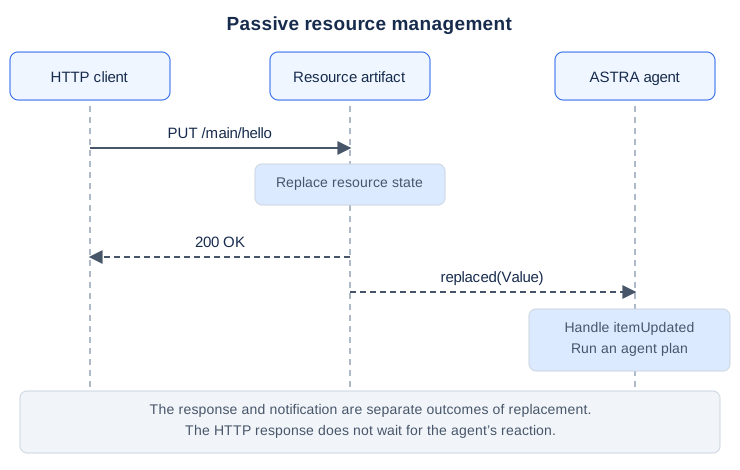
The diagram shows the successful PUT used in the first service example. The response does not wait for the itemUpdated plan to complete, and notification delivery need not occur after the response. GET reads a representation and does not generate this replacement notification.
Observe and change resource state
When a child is attached to a passive collection, the inherited class receives listItemArtifactCreated, focuses on the child and records an itemResource(qualifiedArtifactName, className) belief. You can react to a new Hello item:
plan +itemResource(string ArtifactName, "Hello")
    : artifact(ArtifactName, ArtifactName, cartago.ArtifactId Id) {
    cartago.operation(Id, get(Hello Value));
    console.println("Created greeting for " + oa.getString(Value, "name"));
}
The artifact belief records three values: the resource’s logical name, its qualified CArtAgO artifact name, and its identifier. For the individual hello resource, these names differ. Use its logical name to find its identifier:
plan +!renameHello(string Name)
    : artifact("hello", string QualifiedName, cartago.ArtifactId Id) {
    cartago.operation(Id, get(Hello Value));
    oa.set(Value, "name", Name);
    cartago.operation(Id, replace(Value));
}
get reconstructs the Java object from resource properties. Changing that object alone does not change the artifact: send it back with replace to publish the changed state and generate the replacement notification. Keep the ObjectAccess oa declaration from the first example.
Use CArtAgO property queries and events when you need current fields or individual property changes. Resource state is maintained in artifacts; it is not automatically copied into ordinary ASTRA beliefs.
Active request handling
An active resource queues a supported request and signals:
$cartago.signal(string ArtifactName, httpEvent(int Index, string Method))
The index identifies a queued request on that artifact. The agent must accept or refuse it to complete the response. The current mams.javatypes.Active class includes a default handler that accepts requests. To implement a policy, override the general handler, including the refusal path.
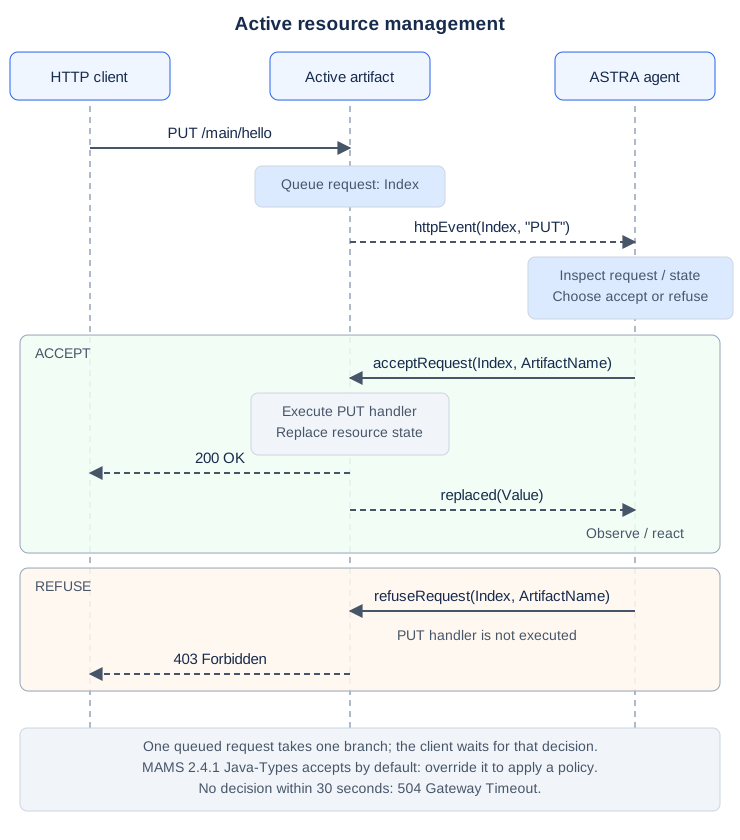
The two framed paths are alternatives for the same queued request. Acceptance invokes the PUT handler, which replaces the state and emits a replaced notification back to the agent. The agent can still observe and react to the final update; interception adds the ability to refuse the request before it changes the resource. The response and this notification are separate outcomes, and the HTTP response does not wait for the agent’s reaction. Refusal returns 403 Forbidden without invoking it. An unsupported method is rejected with 405 Method Not Allowed before this decision path.
For example, replace the first example’s agent with this read-only service:
agent Main extends mams.javatypes.Active {
    plan +!main(list args) {
        mams.MAMSAgent::!setup();
        mams.MAMSAgent::!created("base");
        mams.javatypes.Active::!itemResource("hello", "Hello");
    }

    plan $cartago.signal(string ArtifactName,
            httpEvent(int Index, string Method))
        : artifact(string Name, ArtifactName, cartago.ArtifactId Id) {
        if (Method == "GET" | Method == "OPTIONS") {
            mams.javatypes.Active::!acceptRequest(Index, ArtifactName);
        } else {
            mams.javatypes.Active::!refuseRequest(Index, ArtifactName);
        }
    }
}
With the same Hello.java and POM, GET succeeds and PUT returns 403 Forbidden. This general plan is selected before the inherited handler under ASTRA’s inheritance resolution. A GET-only plan would leave PUT to the inherited acceptance handler.
Within the event plan, the artifact also offers operations for inspecting the pending request:
cartago.operation(Id, header(Index, "Authorization", string Header));
cartago.operation(Id, jsonBody(Index, JsonNode Body));
For the second operation, import com.fasterxml.jackson.databind.JsonNode and use it only when the request has a JSON body. Inspect the request before accepting or refusing it: acceptance and refusal consume the queued request. Header inspection is a building block for an application policy; it does not itself authenticate a client.
Make one decision for each queued request. If a plan fails before making that decision, the request remains pending until it is decided, the client disconnects or the default 30-second decision window expires. Expiry returns 504 Gateway Timeout; late or duplicate decisions fail with unknown_http_event. Keep request handling short and use failure handling to ensure error paths also complete a decision.
Response headers and links
Since MAMS 2.4.0, an agent can add headers and links to a resource’s responses:
MAMSAgent::!setResourceHeader("hello", "Cache-Control", "no-cache");
MAMSAgent::!addResourceLink("hello", "describedby", "http://localhost:9000/docs/hello");
Links are sent in a Link header, such as <http://localhost:9000/docs/hello>; rel="describedby", and HAL representations also list them in _links. If the response sets a header itself, such as Content-Type, that value is used. A resource made with MAMSAgent::!createResource has a self link from the start. WebSub uses these links to advertise a topic’s hub.
Call another service
mams.MAMSAgent provides goals for making HTTP requests through the shared REST client. A client agent can call an ordinary microservice or another MAMS agent in the same way.
For example, run this agent in a separate project/process while the passive Hello service is running on port 9000:
import mams.web.HttpResponse;

agent Main extends mams.MAMSAgent {
    plan +!main(list args) {
        mams.MAMSAgent::!setup(9001);
        mams.MAMSAgent::!get(
            "http://localhost:9000/main/hello", HttpResponse Response);
        if (httpUtils.hasCode(Response, 200)) {
            console.println(httpUtils.bodyAsString(Response));
        } else {
            console.println("Could not read the Hello resource");
        }
        S.exit();
    }
}
Use the same Maven dependencies as the first example. The client uses port 9001 because it creates its own application infrastructure. It does not create a base, so it does not expose a resource body. S.exit() ends this client application.
The core class also provides post(uri, jsonBody, response), put(uri, jsonBody, response) and delete(uri, response) goals, plus a general httpRequest(request, response) goal. Since 2.4.0, post(uri, body, mediaType, response) and post(uri, headers, body, response) send other media types or custom headers. The mams.HttpUtils module builds requests and reads status, headers and content. Check the HTTP status before treating the result as successful. For a POST that creates a resource, retrieve its URI with httpUtils.header(Response, "Location").
Host several agents in one service
One agent calls mams.MAMSAgent::!setup(port) to create the shared infrastructure. Additional MAMS agents in the same application call:
mams.MAMSAgent::!init();
mams.MAMSAgent::!created("base");
init() links the agent to the local environment and locates the existing web server and REST client. Each agent then creates its own resources beneath its own base URI. Coordinate startup so setup finishes before other agents call init. Use the techniques in Creating Multiple Agents to create and initialise the agents.
Run setup once per JVM. Separate service processes each need their own setup and a free port. Internal agents can use ASTRA messages; services can use HTTP across process boundaries.
Choose a resource contract
Decide what clients can submit, what the agent owns and how clients learn that work has completed. A passive POST can acknowledge creation before an agent has acted on the new item. If clients need completion information, model it as resource state that they can subsequently read.
Java-Types resources are useful for simple data contracts. For schema-driven validation or hypermedia representations, examine the JSON Schema, HAL and RDF modules in the reference implementation. Their agent classes and artifact APIs differ; changing the Maven dependency alone does not convert a Java-Types service into another resource model.
For complete runnable projects, see MAMS example projects.
See the MAMS resource API reference for goal signatures, beliefs, artifact operations and event patterns.
HTTP formats and errors
The current implementation negotiates JSON, HAL or optional Hydra/JSON-LD using Accept, including quality values and wildcards. Missing Accept defaults to JSON for the typed artifacts. Representation responses identify the selected Content-Type and include Vary: Accept. Request bodies use UTF-8; missing Content-Type is treated as JSON for compatibility.
Status |
Meaning |
|---|---|
|
Malformed, empty or null request body |
|
The agent refused a supported active request |
|
The requested resource or route does not exist |
|
The artifact does not support the requested method |
|
No supported representation matches |
|
A child resource name is already in use |
|
Unsupported request format, encoding or charset |
|
Resource validation failed, such as a rejected identifier change or JSON Schema data |
|
Unexpected failure in processing or dispatch |
|
The agent did not decide on a pending request in time |
Errors have a stable JSON shape, even when the requested success representation is HAL or JSON-LD. For example, an active refusal returns:
{"error":"forbidden","message":"Request refused"}
Error responses use Content-Type: application/json; charset=UTF-8. Unexpected causes are logged on the server; exception messages and stack traces are not returned to clients. Request-format checks can reject a write before agent dispatch or resource modification.
Outgoing calls use a 10-second connection timeout and a 30-second request deadline by default. Transport failures fail the action; HTTP error statuses remain responses for the agent to inspect. Response header lookup is case-insensitive, and empty response bodies are empty data rather than null.
For JSON-LD representations, add the optional mams-cartago-hydra:2.4.1 provider and request application/ld+json. See Hydra and JSON-LD resources for identities, discovery routes and the supported write profile.