Decide how requests are handled
Resource management determines whether a supported HTTP operation proceeds immediately or waits for the agent’s decision. Choose that boundary from your resource contract, rather than from whether the agent performs proactive work.
Start with passive management
The greeting collection from chapter 2 processes supported writes directly and notifies the agent afterward. This fits a contract where creating or replacing data is permitted without deliberation. The agent may still reason proactively after the change.
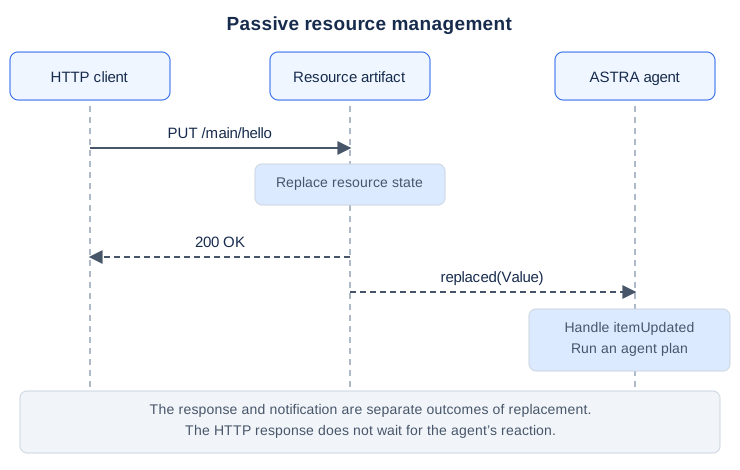
If a later agent plan cannot achieve a business goal, that does not undo the earlier HTTP write. Model that outcome explicitly, as the delivery tutorial does with status: "failed".
Intercept a supported request
An active resource queues a supported request and emits httpEvent(Index, Method). The index identifies that request on that artifact. The agent can inspect it and call !acceptRequest or !refuseRequest.
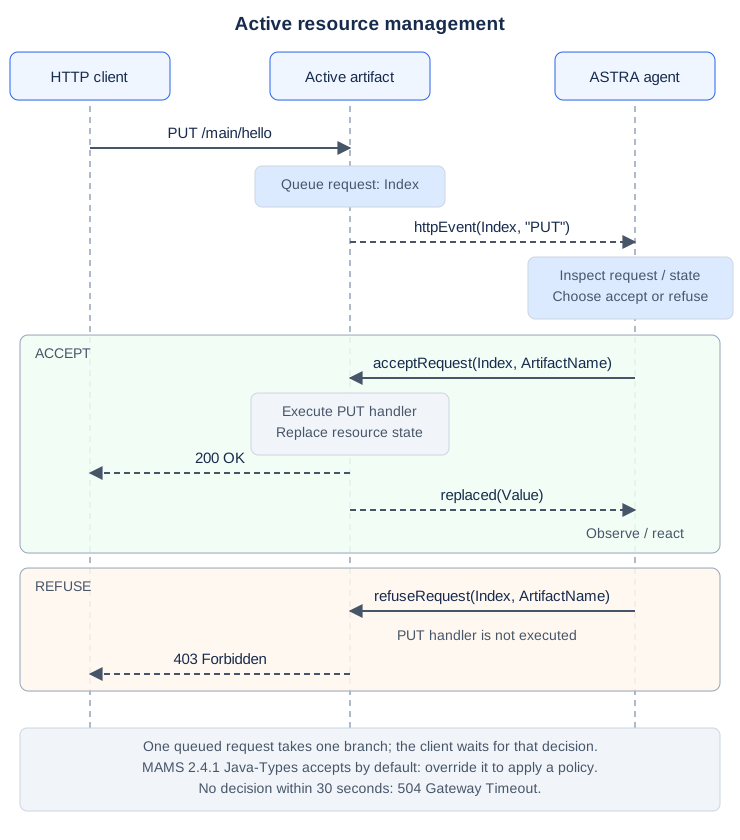
Extending mams.javatypes.Active alone does not install a restrictive policy: its inherited handler accepts requests. Override the general event handler so methods you did not intend to permit do not fall through to that default.
Download the active read-only item. Its policy is:
agent Main extends mams.javatypes.Active {
    module Strings strings;

    plan +!main(list args) {
        mams.MAMSAgent::!setup();
        mams.MAMSAgent::!created("base");
        mams.javatypes.Active::!itemResource("hello", "Hello");
    }

    plan $cartago.signal(string ArtifactName, httpEvent(int Index, string Method))
        : artifact(string Name, ArtifactName, cartago.ArtifactId Id) {
        if (Method == "GET" | Method == "OPTIONS") {
            mams.javatypes.Active::!acceptRequest(Index, ArtifactName);
        } else {
            mams.javatypes.Active::!refuseRequest(Index, ArtifactName);
        }
    }
}
Stop the passive service and start this project with mvn clean compile astra:run. GET /main/hello succeeds. Try the same PUT as chapter 1: it now returns 403 Forbidden, and a following GET shows the unchanged state.
An unsupported method returns 405 before the decision plan. 403 means the resource supports the operation but the agent refused it. These two outcomes tell clients different things.
Complete the decision on every path
Inspect pending headers or a JSON body before accepting or refusing; either decision consumes the queued request. A late or duplicate decision fails with unknown_http_event. The default decision window is 30 seconds; expiry returns 504.
Keep interception short. Long-running business work belongs after submission, with a result resource clients can read. Ensure inspection failures also lead to a refusal or another explicit outcome: a failed plan does not automatically become an HTTP refusal. The detailed request handling section covers operations for inspecting the queue.
A read-only policy is not authentication. Checking an Authorization header requires a real application policy for validating it; simply finding the header does not identify a caller.
Apply the contract to delivery requests
For deliveries, permit POST to the collection and GET to read results. Refuse client PUT and DELETE because they could overwrite agent-owned progress or remove a live request. On creation, reset service-owned fields rather than trusting them in the client’s JSON.
There are two validation moments:
Moment |
Outcome a client can observe |
|---|---|
Before creation |
An HTTP error and no newly created request |
After creation, in the agent |
A request resource recording a failed business outcome |
The existing delivery example uses the second approach for missing business fields. Its 201 response therefore does not guarantee that a valid delivery was accepted or completed. Choose and document the semantics deliberately.
Try it
Test GET, PUT and an unsupported method against the read-only item. Then inspect the delivery policy and identify which part prevents a client from claiming a parcel has been delivered.
Next: Connect services.